Review Comments (0) Screenshots (6) Questions & Answers (0) Votes (4) Wiki  
(4)
Lauyan Software
4.1.0.612
www.lauyan.com
Shareware
29,90  Purchase
2 046 people
Download Lauyan TOWeb

Downloaded 560 times

 
Video tutorial for Lauyan TOWeb 4.0
Frame
Video tutorial for Lauyan TOWeb 3.1
Frame
This video tutorial has been acquired from Downloadtube.com

Review

This is official description applies to version 4.0

Lauyan TOWeb is an easy-to-use software to create a blog, create a website (personal, associative, professional..) or create an e-commerce website, quickly, without programming or using any complex software for your pictures and without being left alone in front of a blank page with dozens of incomprehensible options.
 
The following review written by one of the Software Informer contributors applies to version 3.1

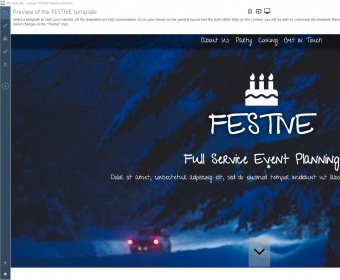
Lauyan TOWeb is a program that will help you design simple websites. With this program you will be able to create sites (including blogs or personal and professional websites) without need to know how to deal with HTML code. Lauyan TOWeb will even allow you to create e-commerce websites, for you to sell your products through the Internet.

This application will guide you (as in a step-by-step wizard) to create your site just by adding all the information and all the elements you wish to include in it. You will be prompted to enter details such as the Website’s Title, the favicon you want to use, the theme, banner, font, colors, smilies, headers, footers, and any other content you want to have displayed in your site. You will be able to take a look at your site at any time just by pressing the "Preview" button. You may also want to set your e-commerce options, build your catalogs and manage your payment methods. When you are done, you can use the program to publish your site in your preferred server.

To make things even easier, you can access online help to better understand how to perform each step at any stage during the process.
  • It is free.
  • It allows you to build simple sites without the need of any HTML knowledge.
  • None.

Reviewed by: Daniel Ángel Romero

Reviewer rating:

Reviewed: Last year

What's new in version 3.1

•improvement : the new formatting syntax *!text!* place a text in bold characters like the syntax **bold text** does but add stronger meaningful information for search engines (such as Google for instance). It is recommended to use this new syntax only when a text in bold are important keywords and use the normal bold syntax for words you just want your visitors to see. For instance let's say you have a music website then such a sentence will use the new syntax "our XYZ website contains *!free mp3 music!*" as these words are important for search engines, but in this sentence "please write your payment check to the order of XYZ and **add your order number on the back of your check**" the normal bold syntax is used as text in bold is only important for your internet visitors
•improvement : you can use the new tag <nowiki> whenever you don't want TOWeb to transform reserved text notations. The start tag is <nowiki> and the end tag is </nowiki>. Example: <nowiki>**this text won't be in blod**</nowiki>
•bugfix : multiple choice lists used as mandatory field in a form where not working properly when displayed in several columns
•bugfix : if you use a TOWeb predefined scripts containing a logos & ads (%TW-ADn%) they will no longer be opened in the web browser window of your site but in a new window.

What's new in version 2.6

•improvement : the new formatting syntax *!text!* place a text in bold characters like the syntax **bold text** does but add stronger meaningful information for search engines (such as Google for instance). It is recommended to use this new syntax only when a text in bold are important keywords and use the normal bold syntax for words you just want your visitors to see. For instance let's say you have a music website then such a sentence will use the new syntax "our XYZ website contains *!free mp3 music!*" as these words are important for search engines, but in this sentence "please write your payment check to the order of XYZ and **add your order number on the back of your check**" the normal bold syntax is used as text in bold is only important for your internet visitors
•improvement : you can use the new tag <nowiki> whenever you don't want TOWeb to transform reserved text notations. The start tag is <nowiki> and the end tag is </nowiki>. Example: <nowiki>**this text won't be in blod**</nowiki>
•bugfix : multiple choice lists used as mandatory field in a form where not working properly when displayed in several columns
•bugfix : if you use a TOWeb predefined scripts containing a logos & ads (%TW-ADn%) they will no longer be opened in the web browser window of your site but in a new window.
Report a wrong version Report a wrong program title Suggest a correction

Screenshots

Main window Main window Start Start Theme Theme Settings Settings
All 6 screenshots

Latest comments


There are no comments, be the first one!
Add new comment

E-mail Address:

Password:

Register now »

Forgot password?

Sign in with:
Download Software Informer Client
Copyright © 2012, Informer Technologies, Inc. About| Privacy and terms| Help| Feedback & Support| Partners program